
Photo by Maxim Berg on Unsplash
Every time I publish a blog post, I want my newsletter subscribers to hear about it. The problem is I kept forgetting to actually send it and when I did remember, navigating Mailchimp's bloated UI felt like punishment. So I decided to automate the whole thing, but with a human-in-the-loop step before anything goes out.
The result is two open-source projects:
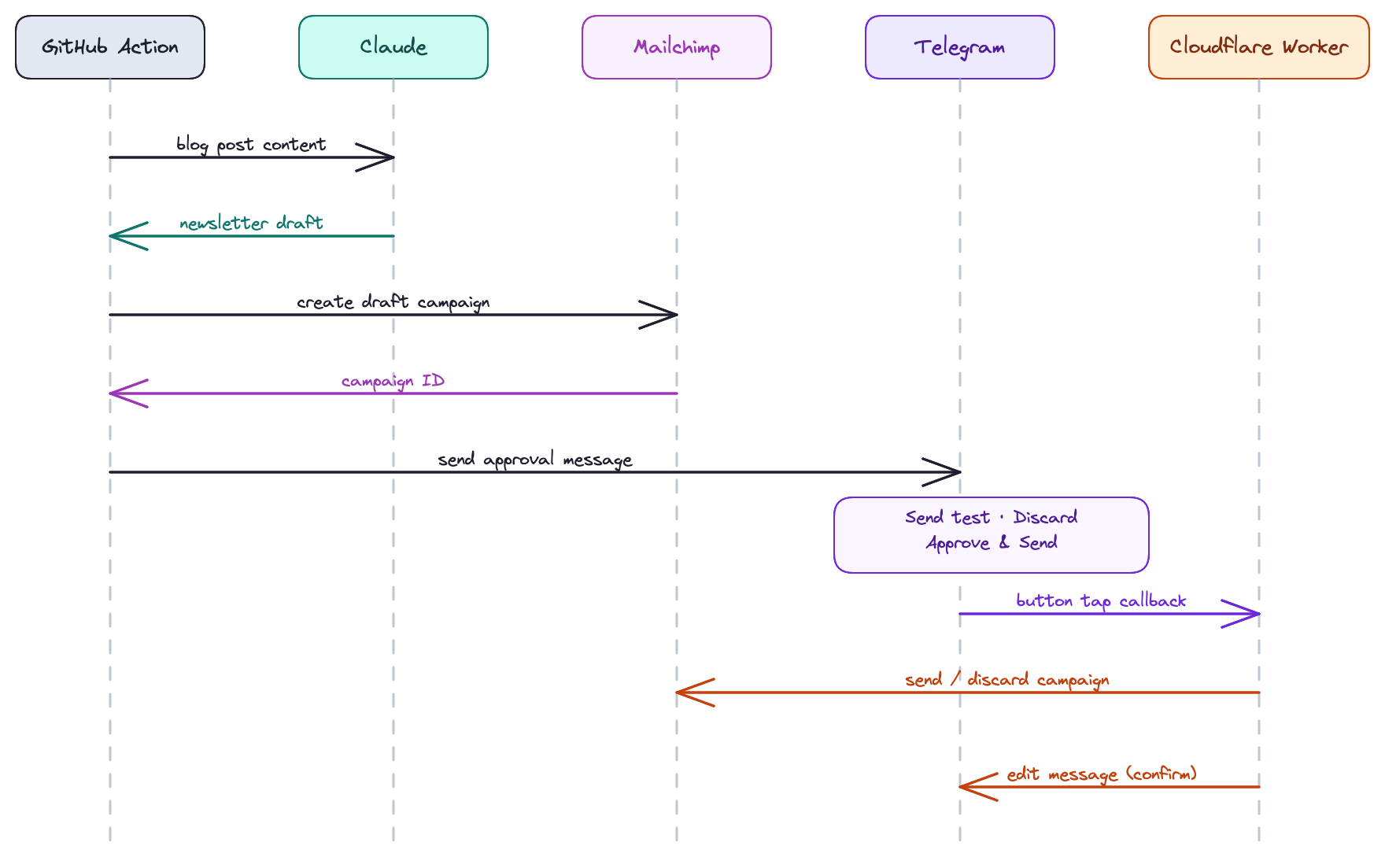
- blog-to-newsletter-action: a GitHub Action that detects a new post, generates a newsletter with Claude, creates a Mailchimp draft, and pings me on Telegram for approval
- blog-to-newsletter-worker: a Cloudflare Worker that receives the Telegram button taps and acts on them
How it works
When a PR that adds a new blog post is merged to main, the action kicks in:
- It calls the GitHub API to find which
.mdfiles were added in that commit - Reads the content of each post
- Sends everything to Claude with a prompt asking for a short, punchy newsletter
- Creates a draft campaign in Mailchimp
- Sends me a Telegram message with the subject, preview text, and three buttons: Send Test Email, Discard, and Approve & Send
Tapping a button hits the Cloudflare Worker, which calls the appropriate Mailchimp endpoint and edits the Telegram message to confirm.
Usage
In practice, here's how I set up the workflow on my blog:
name: Newsletter

on:
  push:
    branches: [main]
    paths:
      - "src/blog/**"

jobs:
  newsletter:
    runs-on: ubuntu-latest
    steps:
      - name: Checkout
        uses: actions/checkout@de0fac2e4500dabe0009e67214ff5f5447ce83dd # v6.0.2
        with:
          persist-credentials: false

      - uses: peterpeterparker/blog-to-newsletter-action@main
        with:
          blog_posts_path: "src/blog"
          blog_base_url: "https://daviddalbusco.com"
          blog_author: "David"
          github_token: ${{ secrets.GITHUB_TOKEN }}
          mailchimp_api_key: ${{ secrets.MAILCHIMP_API_KEY }}
          mailchimp_reply_to: "hi@daviddalbusco.com"
          mailchimp_list_id: "123456"
          mailchimp_test_emails: "hi@daviddalbusco.com"
          anthropic_api_key: ${{ secrets.ANTHROPIC_API_KEY }}
          telegram_bot_token: ${{ secrets.TELEGRAM_BOT_TOKEN }}
          telegram_chat_id: ${{ secrets.TELEGRAM_CHAT_ID }}
The infrastructure
The GitHub Action runs as a Docker container that uses Bun as its runtime. It pulls the image from Docker Hub when the workflow runs. The action is also listed on the GitHub Marketplace so it is easy to discover and reference by version.
The Cloudflare Worker handles the Telegram webhook callbacks. My first idea was to run this handler as a Docker container on a VPS alongside the action, but given how rarely I send newsletters, the cost of maintaining a server for something that fires maybe once a month felt hard to justify hence picking a free tier that fits.
The action can be used out of the box with some configuration as for the worker, it has to be forked and deployed by yourself.
The architecture
Both projects are written in TypeScript and designed to be extensible. Mailchimp, Claude, and Telegram are the current providers, but swapping any of them out should be straightforward. I also built the pipeline to be reusable beyond blog posts. One can imagine that something is committed and needs a boring task handled by AI but needs a human review before being pushed out to consumers.
Each service is a class decorated with a provider interface (@NewsletterProvider, @AIProvider, etc.). The decorator enforces that the class implements the expected interface and exposes a static create() method, making the boundaries explicit and the implementation swappable.
Fun fact: I could have used abstract classes instead, but abstract classes in TypeScript cannot enforce static methods. A decorator on a concrete class is the cleanest way to enforce both the instance interface and the static factory method at the same time.
Each create() method validates required env vars on instantiation, throwing immediately if anything is missing. For everything else, no function throws but always returns a result.
@NewsletterProvider
export class Mailchimp {
    readonly #apiKey: string;

    private constructor({ apiKey }: { apiKey: string }) {
        this.#apiKey = apiKey;
    }

    static create(): Mailchimp {
        const { MAILCHIMP_API_KEY } = process.env;

        assertNotEmptyString(MAILCHIMP_API_KEY, "MAILCHIMP_API_KEY");

        return new this({ apiKey: MAILCHIMP_API_KEY });
    }

    async generateNewsletter(blog: Blog): Promise<Result<NewsletterPayload>> {
        const messageResult = await this.#createMessage(blog);

        if (messageResult.status === "error") {
            return messageResult;
        }

        const { result: messageResponse } = messageResult;

        return this.#buildNewsletter(messageResponse);
    }
}
Security
A few small things worth calling out.
- The Cloudflare Worker only accepts POST requests to
/telegram/<TELEGRAM_SECRET>, where the secret is a random 32-character string set as a Worker secret. Anything hitting the wrong path gets a 403. - The Telegram bot token and Mailchimp API key are stored as Worker secrets and never exposed in code or logs.
- On the action side, the
actions/checkoutstep uses a pinned commit SHA andpersist-credentials: false. The action itself is also pinned by SHA in the caller workflow, so a new release never silently changes behavior.
Lean dependencies
Given how many npm supply chain attacks have made the news lately, I kept the dependency footprint small on purpose. Both projects share a single runtime dependency: zod. Everything else is built on standard Web APIs and Bun built-ins.
Interesting gotchas
A few things that came up during the development that I thought were worth sharing.
Detecting added files via the GitHub API
My first instinct was to use git diff inside the Docker container. It just turned out not to work: the workspace is mounted by GitHub Actions and owned by root, but the container runs as the bun user, so git kept throwing permission errors on .git/FETCH_HEAD, .git/shallow, and a few other files it needed to write to. Some might argue that I could have just run the app as root of course but, that's IMO a bad practice.
I eventually switched to the GitHub API instead. The commits endpoint returns exactly what I need, the list of files added in a commit, and it requires no filesystem access at all:
const response = await fetch(`https://api.github.com/repos/${repository}/commits/${sha}`, {
    headers: { Authorization: `Bearer ${token}` }
});
Much simpler, zero permission issues.
Prompting Claude for a newsletter
The prompt is extracted into a prompt.md file and imported as text using Bun's native text import:
import prompt from "./_prompt.md" with { type: "text" };The file uses {{author}}, {{audience}}, and {{posts}} as placeholders, replaced at runtime. Having the prompt in a Markdown file makes it much easier to iterate on without touching the code. Moreover, if the action ever gets more widely used, it would also make it straightforward for consumers to swap in their own prompt entirely.
The key constraint in the prompt though is handling the respond only with valid JSON, no markdown fences, no preamble.
Despite that, Claude occasionally wraps the response in ```json fences anyway. So I strip them before parsing:
const raw = content
    .join("")
    .replace(/^```json\s*/i, "")
    .replace(/^```\s*/i, "")
    .replace(/```\s*$/i, "")
    .trim();
Keeping fetch call sites readable with Zod codecs
Instead of inlining JSON.stringify and JSON.parse directly in every fetch call, I used Zod codecs to handle serialization, deserialization, and validation in one place.
For example:
export const AnthropicMessageCodec = z.codec(AnthropicMessageSchema, z.string(), {
    decode: ({ model, maxTokens, content }) =>
        JSON.stringify({
            model,
            max_tokens: maxTokens,
            messages: [{ role: "user", content }]
        }),
    encode: (json) => JSON.parse(json)
});
Then the fetch call site just becomes:
body: AnthropicMessageCodec.decode({
    model: this.#model,
    maxTokens: this.#maxTokens,
    content
});
The fetch call stays focused on the request logic. The codec owns the wire format and validates the input and output.
Embedding test emails in the callback data
The Telegram approval message optionally includes a Send Test Email button. That button needs to know which email addresses to send to, but the Cloudflare Worker has no access to the action's environment, by design. I did not want consumers to have to configure the same emails in two places, so the Worker only sees what Telegram sends it.
The solution: embed the emails directly in the button's callback_data:
test:campaignId:email1@example.com,email2@example.comThe Worker parses the callback data, extracts the emails, validates them with Zod, and calls the Mailchimp test endpoint. No shared state, no extra secrets in the Worker.
Not editing the message after a test email
After sending a test email, I originally called editMessage to append a confirmation line. That removed the Approve and Discard buttons from the chat, which meant I was stuck with no more actions. So I just dropped the editMessage call for the test action. When you tap "Send Test Email" you are supposed to get an email anyway, that's your feedback.
Conclusion
If you publish a blog and send newsletters, feel free to fork blog-to-newsletter-worker and drop blog-to-newsletter-action into your repo. I'll be using it for "real" with this very first post.
Until next time!
David